SASS用法指南
光看是没用的,过不了多久就忘光光,所以还是记录一下吧。
首先windows还是离不开我,所以还是环境还是windows..
一、SASS环境安装配置
SASS是ruby写的,所以要想将sass编译成css文件,就给配上ruby环境。
windows下载装个 rubyinstaller 就行了,注意要保证 配置好环境变量。
比如 E:\Ruby22-x64\bin 配置到系统环境变量 path中
cmd命令行执行 ruby -v 正确则安装配置正确
接下来是使用gem给我们装上sass
一般的做法是直接
gem install sass
但很多时候回报错,也许是国内网络太差被封杀了.. 通过 -V 参数可以看到具体信息
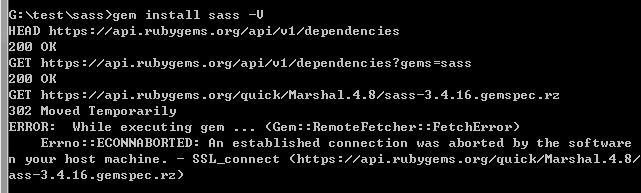
一般来说,淘宝团队都提供了很多镜像,去看看~
使用简单的命令,切换源就行
gem sources --remove https://rubygems.org/
gem sources -a https://ruby.taobao.org/
gem sources -l
*** CURRENT SOURCES ***

https://ruby.taobao.org
# 请确保只有 ruby.taobao.org
 gem install rails
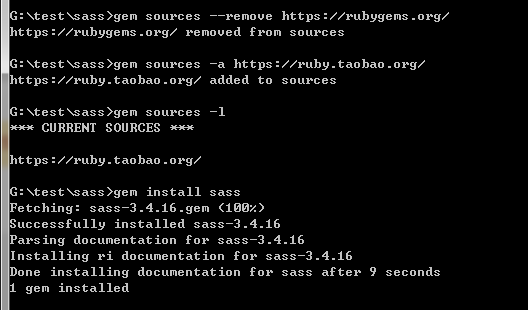
sass安装成功,先来体验一下吧~
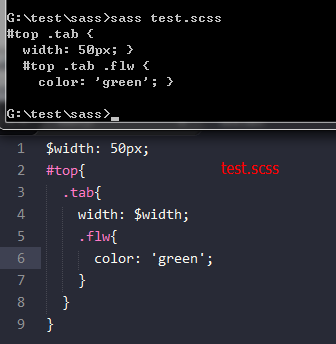
在sass目录下新建一个test.scss文件,写入几句,直接执行看看。
可使用 sass test.scss test.css 将scss文件直接编译成css文件
二、SASS用法:
如上例test.scss文件,我可以定义编译后css代码的风格。
* nested:嵌套缩进的css代码,它是默认值。
* expanded:没有缩进的、扩展的css代码。
* compact:简洁格式的css代码。
* compressed:压缩后的css代码。
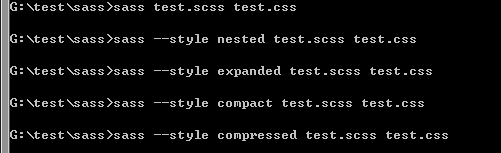
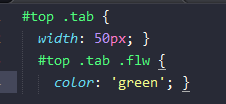
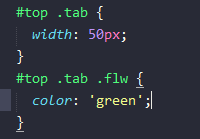


也可以直接定义监听文件的改动,修改scss文件,css将会得到同步更新

接下来,谈谈sass的各语法
1.像css那样,直接定义
div{width:50px;}
2.使用变量,变量有$标识符,如果要定义默认变量值,则在后方加上 !default即可。
如果变量要放在字符串里头,就用 #{}包含.可以使用计算功能
$width: 500px;
$height: 300px !default;
$side: right;
div{
    border-#{$side}-width: $width / 5;
}

  |
  |
  |

div {
  border-right-width: 100px;
}
3.嵌套。sass可以进行选择器的嵌套,表示层级关系,看起来很优雅整齐。如果要使用父类,就用&符,如常见的 a:hover
$width: 500px;
div{
    width: $width;
    .answer a{
        &:hover{text-decoration:none;}
    }
}

    |
    |
    |

div {
  width: 500px;
}
div .answer a:hover {
  text-decoration: none;
}
4.混入(Mixins). 类似于定义一个宏/函数,然后在需要的地方调用
// *.scss

$width: 500px;
@mixin right($color: '#0f0'){
    font-weight: bold;
    color: $color;
}

div{
    width: $width;
    .answer{
        @include right();
    }
}

//---------------------------------------
// *.css

div {
  width: 500px;
}
div .answer {
  font-weight: bold;
  color: "#0f0";
}
5.导入其他scss或css文件 @import , 导入scss文件会自动编译展开,导入css则原样置入
//test.scss
$width: 500px;
div{
    width: $width;
    .answer a{
        &:hover{text-decoration:none;}
    }
}
@import './test1.css';
@import './test1.scss';
p{width: $width / 10;}

//test1.css
p.new{
    color: red;
}

//test1.scss
$width: 200px;
#nav{
    width: $width;
}

//最后,test.css  可以看到,$width变量的值已经更新
@import url(./test1.css);
div {
  width: 500px;
}
div .answer a:hover {
  text-decoration: none;
}

#nav {
  width: 200px;
}

p {
  width: 20px;
}
6.继承/扩展 使用 @extend
// *.scss
$width: 100px;

.block{
    color: #333;
    border-left: 1px;
}
.block-1{
    @extend .block;
    width: $width / 2;
}
.block-2{
    @extend .block-1;
    background-color: green;
}

//  *.css
.block, .block-1, .block-2 {
  color: #333;
  border-left: 1px;
}

.block-1, .block-2 {
  width: 50px;
}

.block-2 {
  background-color: green;
}
7.颜色函数,sass内置了许多颜色函数,例如加亮、变暗、颜色梯度等。
如:
lighten(#cc3, 10%) // #d6d65c
darken(#cc3, 10%) // #a3a329
grayscale(#cc3) // #808080
complement(#cc3) // #33c
8.其他比较少用到的方法
1] 变量也可以有多个值:类似于一个数组
// *.scss
$px : 1px 2px 3px 4px;

div{
    border-left: nth($px,2);
}

// *.css
div {
  border-left: 2px;
}
2]可以用map做key-value关系 用@each遍历(类似于php语法)
// *.scss
$headings : (h1: 12px,h2:13px,h3:14px);
@each $header,$size in $headings{
    #{$header}{
        font-size: $size;
    }
}

// *.css
h1 {
  font-size: 12px;
}

h2 {
  font-size: 13px;
}

h3 {
  font-size: 14px;
}
3] 跳出选择器嵌套 @at-root 不过应该很少用到,如果要跳出媒体的嵌套例如 @media .block-1{}的,type就选media|all
语法为 @at-root (without: type) type有四种:all(所有),rule(常规css,默认),media(media),support(support)
// *.scss
.block-1{
    border-left:1px;
    .flw{
        color: red;
        @at-root{
            .today{
                font-size: 14px;
            }
        }
    }
    @at-root .tomo{
        font-size: 12px;
    }
}

// *.css
.block-1 {
  border-left: 1px;
}
.block-1 .flw {
  color: red;
}
.today {
  font-size: 14px;
}
.tomo {
  font-size: 12px;
}
4]条件判断和循环等
// *.scss
$width: 25px;
.block-5{
    width: 50px;
}
// 现在不包含4,如果是froms 1 through 4 ,就会包含4
@for $i from 1 to 4{
    .block-#{$i}{
        @if $i % 2 == 0 { width: $width;}
        @else {width: 50px;}
    }
}

// *.css
.block-5 {
  width: 50px;
}

.block-1 {
  width: 50px;
}

.block-2 {
  width: 25px;
}

.block-3 {
  width: 50px;
}
5]当然了,也可以定义个函数,然后调用~
逐增width 这css越来越像编程了..
// *.scss
$width: 25px;

.block-5{
    width: 50px;
}
@function inc($num){
    @return $num + 1;
}
@for $i from 1 through 4{
    .block-#{$i}{
        @if $i % 2 == 0 {
            $width: inc($width);
            width: $width;
        }
        @else {width: 50px;}
    }
}

// *.css
.block-5 {
  width: 50px;
}

.block-1 {
  width: 50px;
}

.block-2 {
  width: 26px;
}

.block-3 {
  width: 50px;
}

.block-4 {
  width: 27px;
}
相关文章
最新发布
阅读排行




热门文章
猜你喜欢